DamonSX2 Pro - PS2 Emulator
- 3.3
- Rating
- 1.00M
- Installs
- Free
- Price

 Analysis by App-foxy
I approached DamonSX2 Pro as a practical Android emulator rather than as a simple game launcher. Its purpose is to let a compatible Android device act as a PlayStation 2 emulation platform, and that immediately makes the experience more demanding than ordinary library or demo apps. The app is free, aimed at Everyone, and comes from Reinferno Pvt. Limited. In my testing mindset, the important question is not only whether a game opens, but whether the interface, controls, and setup process remain manageable for people with different abilities, devices, and playing environments.
The short version is that this is an interesting option for technically confident users who want an open-source LGPL emulator and are willing to adjust settings themselves. It is less convincing for someone who expects console-like simplicity, automatic compatibility, or effortless touch controls. I found the strongest part of the experience to be its flexibility; the weakest part is that flexibility also transfers responsibility to the user.
Getting oriented without losing patience
The first impression is shaped by the emulator’s role as a library and demonstration tool. You are not opening a curated streaming service with an instant catalog. You are working with an application that needs access to your own legally obtained game files and the relevant emulator components. That distinction matters for navigation: the app can be useful, but it does not remove the organizational work involved in preparing a PS2 setup.
You May Also Like

 Blood Strike: 2.5 Anniversary
Blood Strike’s Loadouts Turn Every Drop Into a Tactical Gamble
A close look at Blood Strike’s custom loadouts: how fast access to signature weapons reshapes its battle royale rhythm, rewards preparation, and narrows the gap between fights.

 Pandora - Music & Podcasts
Pandora’s Music Is Easy to Start, but Harder to Recover
Pandora’s strength is its low-effort path from a seed to a station. Its weak spot is how much confidence it asks you to place in connection, setup, and quiet recovery.

 8 Ball Pool
 Is Built on Rivalries, Rematches, and Routine
A close look at the rivalries, rematches, shared routines, and unanswered safety questions that turn a quick pool match into a persistent mobile community.

 Samsung Music
’s Quiet Strength Is Playing What You Already Own
Its reach comes less from spectacle than from dependable access to a personal library. That simplicity is both the app’s strongest retention engine and its ceiling.

 AccuWeather: Weather Radar
AccuWeather Review: A Quick, Clear Forecast for Everyday Decisions
For everyday plans, the best forecast is the one you can understand quickly. AccuWeather makes rain timing, radar, and local conditions easy to act on, with a few trade-offs.

 Hill Climb Racing
Why Hill Climb Racing Still Turns Crashes Into One More Run
A tiny car, a bumpy hill and one more upgrade: Hill Climb Racing keeps resurfacing because its simple chaos makes every near-miss feel personal.
More From Our News Desk



I would describe the interface as more suitable for people who are comfortable exploring menus than for complete beginners. Emulator settings tend to involve technical terms, and even when the main actions are understandable, the consequences of changing graphics, performance, or controller options may not be obvious to everyone. A user who reads carefully can usually work through the process, but a user who relies on large, clear, highly guided steps may find the experience tiring.
Readability is not just about text size. It is also about how much information appears before a decision is made. On a phone, a long settings screen can create extra scrolling and make it harder to remember which option was changed. I recommend changing one group of settings at a time, launching the same game after each adjustment, and keeping notes when experimenting. That simple habit makes troubleshooting much less confusing than changing several options at once.
One useful workflow is to create a small test routine before committing to a long play session. I would first check whether the game starts, then test a menu, a demanding scene, a save or load action, and any control that requires several buttons together. This reveals more than a quick launch. It also helps users with attention or memory difficulties because the same repeatable checklist reduces the need to remember every setting.
The app’s current version is 420, and it requires Android 8.0 or later. Those details are important when deciding whether an older phone or tablet is a realistic candidate. Even if the operating system qualifies, emulation can still be demanding, so I would not treat operating-system compatibility as a promise of smooth performance. A newer device may be a better choice than an older model that technically meets the minimum requirement.
The public response is mixed, with a 3.2 average from around 4.2 thousand ratings and roughly 296 written reviews. I read that combination as a reason to approach the app with realistic expectations rather than as an automatic rejection. It has attracted more than a million installs, which shows that many Android users are at least interested in this type of tool, but popularity does not guarantee that every device or game will behave the same way.
Navigation habits that make setup easier
I found that the most accessible approach is to avoid treating the settings menu as something to finish in one sitting. Start with the default configuration, confirm that the basic navigation works, and only then adjust performance or visual options. This is especially helpful for users who become overwhelmed by dense menus or who need extra time to understand unfamiliar controls.
Another practical tip is to use a larger screen when possible. A tablet can make menus easier to inspect and can give touch controls more room, although the app still depends on the capabilities of the device and the game being emulated. If a phone is the only available option, landscape orientation and a clean screen layout may improve comfort, but I would still expect some compromise between seeing the game clearly and leaving enough space for virtual buttons.
For people who use a physical controller, I would set it up before spending time fine-tuning graphics. A controller can reduce the visual clutter created by on-screen buttons and may make long sessions more comfortable. It does not solve every accessibility issue, but it changes the main interaction from tapping small areas of glass to using tactile controls, which can be a meaningful improvement for users with limited precision.
Motor and sensory considerations during play
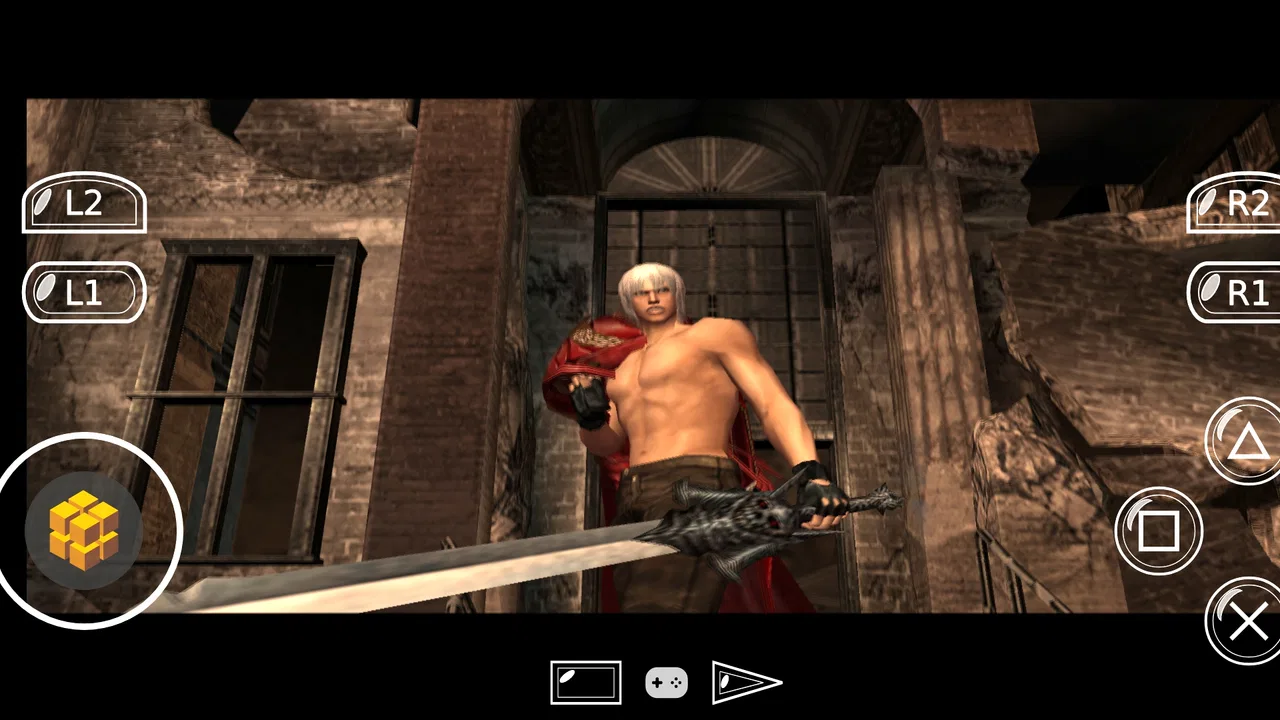
Touch controls are the biggest accessibility question for this kind of emulator. A PS2 game may expect several buttons, directional input, shoulder buttons, and timing-sensitive actions. Reproducing all of that on a phone screen can be awkward, especially when the virtual controls cover part of the picture. I would not recommend relying on touch alone for every type of game, particularly games that demand repeated rapid input or simultaneous button combinations.
A physical controller is the clearest alternative when touch interaction causes strain or missed inputs. It can help users who have difficulty with precise tapping, but the improvement depends on the controller’s shape, button resistance, and the player’s own range of movement. Someone with limited grip strength may prefer a lightweight controller, while someone who needs larger tactile separation may value a layout with clearly distinct buttons. The app can be more usable with external input, but the best choice remains personal.
There is also a fatigue issue that is easy to underestimate. Emulation sessions can involve repeated adjustments, restarts, and testing, especially when a game does not behave well immediately. For a player with chronic pain, tremor, or reduced stamina, that extra setup can be more significant than the game itself. I would plan short sessions, save progress frequently where the game supports it, and avoid changing settings while already tired. A stable configuration is usually more valuable than chasing the last bit of performance.
Visual comfort depends on more than resolution. Fast movement, small interface elements, and a busy game image can make a phone screen difficult to follow. I would test a game in a calm area before judging it, because a menu may look comfortable while an action scene becomes visually crowded. A larger display can help, but it may also require a less portable setup. That is a trade-off rather than a universal solution.
Audio is another situational concern. Playing with sound can make games easier to follow, but headphones may be uncomfortable or unsuitable for some users. Playing silently can remove useful cues in games that rely on sound to signal danger or timing. I would treat audio as part of the control experience and choose the arrangement that best fits the environment, rather than assuming that the default sound setup will suit everyone.
Users who are sensitive to visual motion or flashing effects should be cautious with individual games. The emulator is a platform for running software, so the sensory demands will vary greatly from one title to another. I would preview a game in short intervals and stop if the presentation causes discomfort. No emulator setting can make every game comfortable for every player.
Why touch-only play is not equally practical for every genre
Some games are naturally more forgiving when buttons are pressed occasionally and the player has time to look at the screen. Others depend on fast reactions, accurate analog movement, or several inputs at once. In my view, the difference between those two groups is more important than the app’s basic ability to display a game. A user with limited dexterity may enjoy slower exploration or menu-driven experiences with a controller, yet find action-heavy titles frustrating even when the emulator is working correctly.
This is where DamonSX2 Pro differs from a conventional mobile game. A mobile game is usually designed around the phone’s screen and touch behavior. This emulator is reproducing an older console control system, so the user has to adapt the device to that system. An established console emulator with a friendlier controller editor may be a better choice for someone whose priority is accessible input configuration rather than open-source flexibility.
Using it in real situations
For an everyday example, imagine using a phone during a quiet train journey. The appeal is obvious: a portable device can provide access to a large-format console experience without carrying the original hardware. In practice, I would prepare everything before leaving, test the game at home, connect the preferred controller if one is available, and keep the session short enough to avoid hand fatigue. Trying to solve compatibility problems on a crowded train would be a poor experience, especially for someone who needs extra time to read settings or handle small controls.
A tablet at home creates a different balance. The larger screen may improve readability and make virtual controls less cramped, while a stand can reduce the need to hold the device. That setup may be more comfortable for users with limited wrist movement or anyone who cannot easily maintain a phone grip. The cost is reduced portability, and the larger display does not automatically fix performance or game compatibility.
For a family sharing one Android device, the app can be convenient as a way to keep several emulation-related tasks in one place, but I would establish a simple routine for switching between players. Different users may need different control layouts or performance choices. If one person changes settings without recording them, another player may think the app has suddenly become unreliable. A written note or a small set of agreed presets can prevent that confusion.
It can also suit a hobbyist who wants to compare how a game behaves under different configurations. That user may appreciate the open-source LGPL identity and the ability to investigate options rather than accepting a fixed experience. However, experimentation is not the same as accessibility. More choices can help an experienced user, while the same choices can create barriers for someone who needs a clear, predictable path.
The app is less suitable when the main goal is instant play. If you want a game to install, open, and configure itself with minimal involvement, a native Android release is usually the better option. A native port is designed for the device’s input method and performance limits, whereas an emulator adds another layer between the original game and the player. That extra layer is useful for preservation and flexibility, but it also introduces more opportunities for friction.
Questions worth answering before installing
One natural question is whether the app is free. Yes, DamonSX2 Pro is listed as free. That makes it easy to try without committing money, but free access should not be confused with a completely effortless setup. You still need a suitable Android device and your own lawful game materials. The free price is a reason to test it, not a reason to expect every title to work perfectly.
Another question is whether it is appropriate for children. The age classification is Everyone, but the practical setup is not necessarily child-friendly. An adult may need to handle file organization, controller configuration, and troubleshooting. I would be comfortable describing the app as suitable for a family device when an adult manages the technical side, but I would not hand it to a young child expecting a polished, self-explanatory game launcher.
People also ask whether a phone is enough. The honest answer is that the operating-system requirement only establishes a starting point. Actual results depend on the device, the game, the selected settings, and the control method. I would test one title that matters to you before building a large library around the app. If that test is unstable, adding more games will not solve the underlying problem.
Another concern is whether an external controller is necessary. It is not necessarily required to explore the app, but I consider one strongly preferable for many PS2 games. Touch input can work for basic navigation and some slower experiences, yet a controller usually gives better physical feedback and leaves more of the screen visible. Users with motor difficulties should regard controller support as a major part of their decision, not as an optional luxury.
Finally, should someone choose this instead of another emulator? I would choose it when the open-source LGPL approach, free availability, and willingness to adjust settings matter more than a guided user experience. I would look elsewhere when accessibility depends on exceptionally simple menus, highly detailed remapping, or dependable plug-and-play behavior. The right comparison is not only which emulator runs a game, but which one lets you control it comfortably and recover from problems without excessive effort.
Remaining barriers and my inclusive verdict
The main barrier is the gap between technical possibility and practical usability. An emulator may offer a route to console games, yet still be difficult for someone who needs large controls, minimal menu complexity, stable performance, or clear feedback after an error. DamonSX2 Pro does not become inaccessible to everyone simply because it is technical, but its audience is narrower than the Everyone label might suggest when that label is interpreted as effortless use.
There is also a barrier created by variation. Different games place different demands on sight, hearing, reaction time, memory, and hand movement. A configuration that feels comfortable in one title may be poor in another. That means users should judge the complete combination of device, game, controls, and environment. The app itself is only one part of the experience.
My best advice is to treat setup as an accessibility trial. Use the largest practical display, begin with conservative settings, test touch and physical controls separately, and stop after a short session to check comfort. Keep the configuration that feels predictable rather than the one that looks most advanced. If you need to troubleshoot, change a single option and retest. This approach helps users with many different needs because it reduces both physical strain and cognitive load.
I would recommend DamonSX2 Pro to an Android user who enjoys tinkering, wants a free PS2 emulator, and is comfortable accepting that compatibility and comfort may require personal adjustment. The app has real appeal as a flexible open-source project, and its reach—more than a million installs—shows why it continues to attract attention. Still, the mixed 3.2 average is a useful reminder that an emulator is not a universal plug-and-play solution.
I would skip it if you need a highly guided interface, have no patience for testing, or depend on touch controls that must work perfectly for demanding games. I would also choose a native mobile version or a different emulator when accessible input configuration is the deciding factor. For everyone else, the free download makes a cautious trial reasonable, provided you approach it as a configurable tool rather than a finished console replacement.
In my final view, the app’s inclusive potential comes from giving users room to adapt the experience: a bigger screen, a different controller, shorter sessions, and a carefully tested configuration can make a meaningful difference. Its limitation is that those adaptations are largely the user’s responsibility. The best experience comes to people who value flexibility and can shape the setup around their needs. That makes DamonSX2 Pro worthwhile for the right person, but not the easiest recommendation for users seeking immediate, low-effort access.
FAQs for DamonSX2 Pro - PS2 Emulator
01What is DamonSX2 Pro and how does it work?
DamonSX2 Pro is a high-performance PlayStation 2 emulator for Android devices. It allows users to play PS2 games on their smartphones by emulating the console’s hardware and software environment. The app supports a wide range of PS2 titles, offering features like save states, HD rendering, and controller support for an enhanced gaming experience.
02Does DamonSX2 Pro require a powerful device to run smoothly?
Yes, DamonSX2 Pro requires a relatively powerful Android device to run games smoothly. Devices with higher RAM, a robust CPU, and a dedicated GPU are recommended to achieve optimal performance. Lower-end devices may experience lag or graphical issues, so checking the app’s system requirements is advised before downloading.
03Are all PlayStation 2 games compatible with DamonSX2 Pro?
While DamonSX2 Pro supports a wide array of PS2 games, not all titles are fully compatible or may run perfectly. Some games might experience glitches or performance issues. The developers frequently update the app to improve compatibility and performance, so checking the latest compatibility list on the developer’s website can be helpful.
04Is DamonSX2 Pro legal to use?
The legality of using DamonSX2 Pro depends on how it is used. The emulator itself is legal, but users must own a physical copy of the PS2 games they wish to play. Additionally, downloading or using pirated game copies is illegal. Users are encouraged to dump their own game discs to comply with copyright laws.
05How can users optimize game performance on DamonSX2 Pro?
To optimize game performance, users can tweak the emulator’s settings, such as adjusting the graphics rendering resolution, enabling frame skipping, or turning off certain graphical enhancements. Additionally, ensuring that the device’s firmware is up to date and closing background apps can help improve performance. Regularly checking for emulator updates is also recommended.
Pros
- High compatibility with PS2 games.
- Smooth performance on high-end devices.
- Supports HD resolution enhancements.
- Customizable control settings.
- Frequent updates improve functionality.
Cons
- Requires a powerful device for best performance.
- Some games may experience minor glitches.
- Paid version required for full features.
- Setup can be complex for beginners.
- No online multiplayer support.

DamonSX2 Pro - PS2 Emulator
Gallery